
Proactive Caching
Important:For ongoing Gateway configuration changes, always use the Gateway Configuration Manager, Akeyless CLI, or Helm values (for Kubernetes) to manage settings for the entire Gateway cluster.
Never configure only a single Gateway instance in a cluster. All instances in a cluster must be managed together using the supported tools above. Configuring only one instance, or making changes to individual containers or pods, will result in configuration drift, inconsistent behavior, and potential security or availability risks.
Avoid per-instance container startup command changes for routine updates. These should only be used for initial bootstrap or emergency recovery, not for ongoing management.
Proactive caching preloads and refreshes cache entries in the background to reduce first-read latency.
Note:Proactive caching requires runtime cache and base proactive cache to be enabled (
CACHE_ENABLE=trueandPROACTIVE_CACHE_ENABLE=true).
To use the recommended implementation, also setNEW_PROACTIVE_CACHE_ENABLE=true.
The following diagram illustrates the Gateway proactive caching flow:
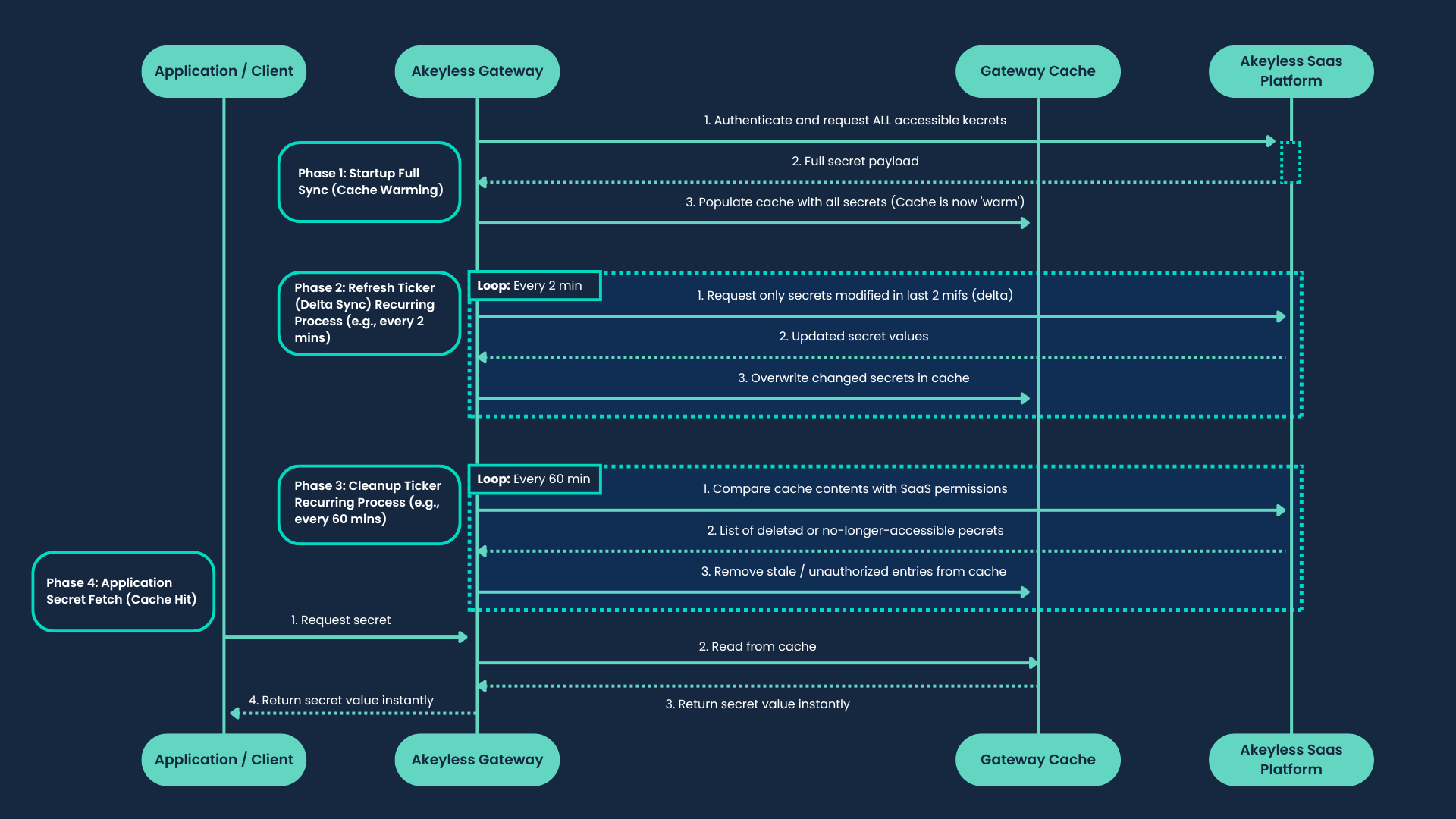
Sync Behavior
Proactive cache runs when CACHE_ENABLE=true and PROACTIVE_CACHE_ENABLE=true.
The recommended implementation runs when NEW_PROACTIVE_CACHE_ENABLE=true is also set.
- Leadership: One Gateway pod acquires a leadership lock for proactive work.
- Startup full fetch: The leader performs an initial list-and-load pass.
- Modified-secrets fetch: Runs every
PROACTIVE_CACHE_MINIMUM_FETCHING_TIMEinterval. - Full fetch: Runs every full-fetch interval (
CACHE_TTL-based). - Zombie cleanup: During full fetch, items missing from current inventory are removed from cache.
If SaaS connectivity is unavailable, proactive jobs stop pulling from SaaS and resume when connectivity returns.
--ignore-cache attempts to bypass cache and read directly from SaaS; for full behavior details, see Gateway Caching.
Access ID Used by Proactive Cache
Proactive cache authenticates to SaaS using the Gateway admin access ID (GW_ACCESS_ID / gatewayAccessId).
All list-items and get-value calls during warm-up are issued under this identity. Proactive warm-up consumes the per-access-ID SaaS rate-limit quota for that access ID.
Rate-Limit Behavior
429 responses can occur when startup warm-up fan-out exhausts the per-access-ID limit window. The recommended implementation handles this automatically with a shared backoff gate:
- Applies a shared backoff delay across proactive workers and RBAC refresh calls on 429.
- Honors
Retry-Afterorwill be released in <duration>headers when available. - Retries up to
PROACTIVE_CACHE_WORKERS × 10attempts before giving up on a cycle.
Leadership-Loss Handling
In the recommended implementation, proactive workers are tied to the current leadership lease. When leadership is lost, active workers stop gracefully, the current cycle drains, and the next leadership cycle starts with a fresh jobs queue to avoid stale backlog carryover.
To further reduce rate-limit risk:
- Reduce
PROACTIVE_CACHE_WORKERSto lower burst concurrency. - Increase
PROACTIVE_CACHE_MINIMUM_FETCHING_TIMEto reduce incremental cycle frequency. - Restrict admin access ID visibility using RBAC so fewer items are warmed up.
- Enable or restart proactive cache during low-traffic windows.
When to Use
Use proactive caching when:
- You want to eliminate first-read latency across your full secrets inventory.
- You want cache to remain warm through planned cache restarts or Gateway reschedules.
- You run multi-pod Gateway workloads and want consistent pre-warmed state across pods.
When Not to Use
Do not use proactive caching when:
- Your secrets inventory is very large and startup warm-up would exhaust SaaS rate limits.
- You want each read to reflect the latest SaaS value without a background warm-up delay.
Configuring Proactive Caching
| Deployment option | How to configure |
|---|---|
| Gateway Console | In the Gateway UI, go to Manage Gateway, then Caching and turn on the Enable Proactive Caching toggle. (Requires Enable Caching to be on first.) |
| Kubernetes (Helm) | Set environment variables under globalConfig.env in values.yaml and apply a Helm upgrade. |
| Standalone Docker | Set proactive cache environment variables in container runtime configuration. |
| Docker Compose | Set the same environment variables in the compose service definition and redeploy. |
| Serverless AWS and Serverless Azure | Set environment variables in the serverless deployment configuration and redeploy. |
Example (values.yaml):
globalConfig:
  env:
    - name: CACHE_ENABLE
      value: "true"
    - name: PROACTIVE_CACHE_ENABLE
      value: "true"
    - name: NEW_PROACTIVE_CACHE_ENABLE
      value: "true"
    - name: PROACTIVE_CACHE_WORKERS
      value: "3"
    - name: PROACTIVE_CACHE_MINIMUM_FETCHING_TIME
      value: "5"
    - name: CACHE_TTL
      value: "60"
For the full key reference, see Helm Values Reference.
Proactive Caching Environment Variables
CACHE_ENABLE: Enables the Gateway runtime cache subsystem required by proactive caching. Default:false.PROACTIVE_CACHE_ENABLE: Enables base proactive caching behavior. Default:false.NEW_PROACTIVE_CACHE_ENABLE: Enables proactive caching using the recommended implementation with configurable worker count and shared rate-limit backoff on 429 responses. Default:false. If this remainsfalsewhileCACHE_ENABLE=trueandPROACTIVE_CACHE_ENABLE=true, Gateway uses the legacy proactive implementation described in Migrating from Legacy Proactive Caching.PROACTIVE_CACHE_WORKERS: Sets the number of concurrent fetch workers for the recommended implementation (requiresNEW_PROACTIVE_CACHE_ENABLE=true). Default:3. Reduce to lower startup fan-out.PROACTIVE_CACHE_MINIMUM_FETCHING_TIME: Sets the modified-secrets fetch interval in minutes for proactive caching. Default:5. Increase to reduce incremental cycle frequency. This value affects proactive refresh cadence in both the legacy and recommended implementations.CACHE_TTL: Influences cache time-to-live and full-fetch cadence. Default:60.PROACTIVE_CACHE_DUMP_INTERVAL: Sets the periodic secure cache backup interval in minutes for the legacy implementation. This variable has no effect whenNEW_PROACTIVE_CACHE_ENABLE=true. For most tuning decisions on the legacy implementation, preferPROACTIVE_CACHE_MINIMUM_FETCHING_TIME; adjustPROACTIVE_CACHE_DUMP_INTERVALonly when you need to change backup cadence specifically.
Note:If Gateway starts without reachable SaaS configuration and initializes cache behavior from environment values, it temporarily enables
NEW_PROACTIVE_CACHE_ENABLE=truefor startup continuity until SaaS configuration becomes reachable.
For Redis topology choices, see Cluster Cache (Standalone) and Cluster Cache High Availability (HA).
Migrating from Legacy Proactive Caching
The legacy implementation is enabled when CACHE_ENABLE=true and PROACTIVE_CACHE_ENABLE=true without NEW_PROACTIVE_CACHE_ENABLE=true. On the legacy akeyless-api-gateway chart, this was also exposed as the cachingConf.proActiveCaching.enabled value.
| Legacy | Current | |
|---|---|---|
| Enabled by | CACHE_ENABLE=true + PROACTIVE_CACHE_ENABLE=true | CACHE_ENABLE=true + PROACTIVE_CACHE_ENABLE=true + NEW_PROACTIVE_CACHE_ENABLE=true |
| Workers | 5 (fixed) | 3 (default, configurable via PROACTIVE_CACHE_WORKERS) |
| Rate-limit handling | None | RateLimitGate shared backoff on 429 |
| Chart | akeyless-api-gateway or env var only | akeyless-gateway |
The legacy implementation uses a fixed worker count with no 429 handling, which can cause repeated rate-limit failures during startup warm-up on large accounts. The new implementation adds backoff and retry logic, configurable concurrency, and is the only implementation that will receive improvements going forward.
If you remain on the legacy implementation, PROACTIVE_CACHE_DUMP_INTERVAL controls the periodic secure cache backup interval. Most legacy tuning decisions should still start with PROACTIVE_CACHE_MINIMUM_FETCHING_TIME, while PROACTIVE_CACHE_DUMP_INTERVAL is mainly relevant when you need to adjust backup cadence.
To migrate:
- If on the
akeyless-api-gatewaychart, migrate to the akeyless-gateway chart first. - Remove any
cachingConf.proActiveCaching.*values if present. - Add
CACHE_ENABLE=true,PROACTIVE_CACHE_ENABLE=true, andNEW_PROACTIVE_CACHE_ENABLE=truetoglobalConfig.envas shown in the configuration example above. - Optionally tune
PROACTIVE_CACHE_WORKERSandPROACTIVE_CACHE_MINIMUM_FETCHING_TIME. - Apply a Helm upgrade.
Updated 4 months ago