
Overview
Secure Remote Access
What Is Secure Remote Access?
Secure Remote Access (SRA) is Akeyless's modern Privileged Access Management (PAM) solution.
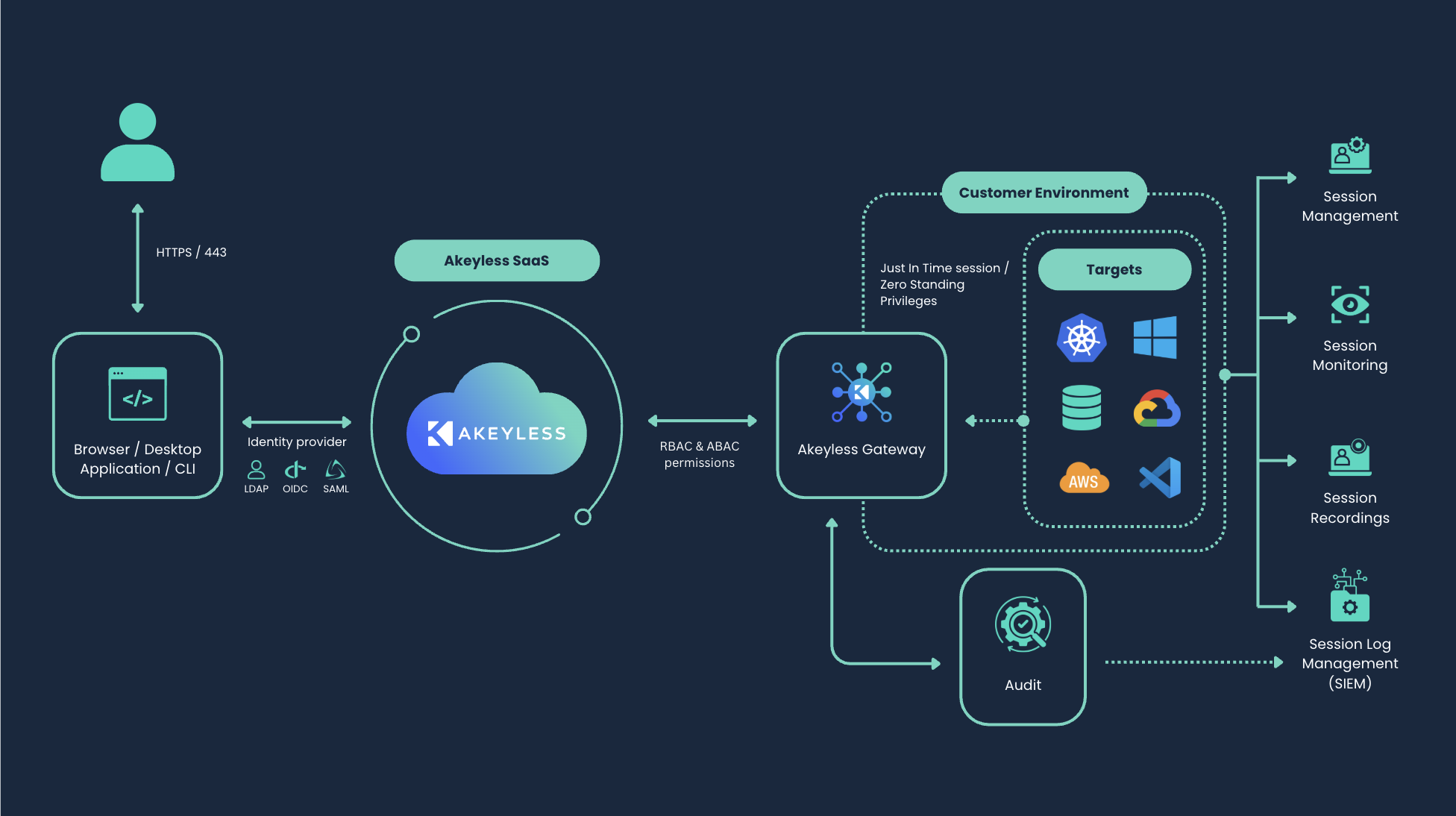
It provides just-in-time, zero-trust access to your infrastructure, without ever exposing credentials to the user. Every connection is brokered by the Akeyless Gateway , so access stays temporary, tightly scoped, and fully auditable.
How It Works
- Authenticate: Users sign in once through their existing identity provider ( for example using SAML, OIDC, LDAP, or Certificates), from whichever access point fits their workflow.
- Authorize: Akeyless checks the user's role-based access control (RBAC) policies to determine exactly which resources they are authorized to access..
- Connect: The user picks a target from the supported Resource Types
- Access, Just-in-Time: SRA generates short-lived credentials on the fly, via Dynamic Secrets (temporary accounts) or Rotated Secrets (existing credentials that cycle automatically after disconnect), and the Gateway proxies the session directly to the target, injecting the credential automatically. The user never sees, copies, or handles the real credential.
Key Features
- Zero Trust by design: users never see or touch real credentials. Every connection is brokered and injected by the Gateway.
- Just-in-time access: credentials are generated per session and expire automatically. There's no standing access and no long-lived secrets.
- Full session auditing and recording: every session is logged, with video recording for RDP and web sessions along with transcripts for SSH, supporting compliance and forensic review.
- Session revocation on demand: administrators can terminate an active session at any time, cutting off access immediately if something looks wrong.
- Request and approval workflows: access can be granted on demand with time-limited grants instead of always-on permissions.
- File transfer : upload and download to protected targets over the same brokered, certificate-based tunnel, no local keys, no standing credentials.
Ways to Access
All access methods below connect through your deployed Akeyless Gateway. They differ only in where the user-facing client lives.
- SRA Portal: Akeyless hosts the portal UI for you, but access still routes through your deployed Gateway.
- Akeyless CLI: scriptable, terminal-based access, also routed through your deployed Gateway.
- Desktop Application: a native app installed on the user's machine. The Desktop app creates the connection locally and routes it through your deployed Gateway.
Supported Resources
SRA supports secure access to: Databases, Windows Remote Desktop, Cloud Services, SSH Servers, RabbitMQ, Kubernetes, Web Applications. See Supported Resource Types for setup details on each.
Next Steps
- New to SRA? Start with the Quick Start guide, the fastest path to a working deployment.
- Choosing the right setup for your environment? See SRA Setup for deployment guides tailored to each supported environment (Kubernetes, Docker Compose).
- Need to configure access to a specific resource? Jump to Supported Resource Types.
Updated about 2 months ago
What’s Next
Did this page help you?