
Gateway Overview
Akeyless Gateway Overview
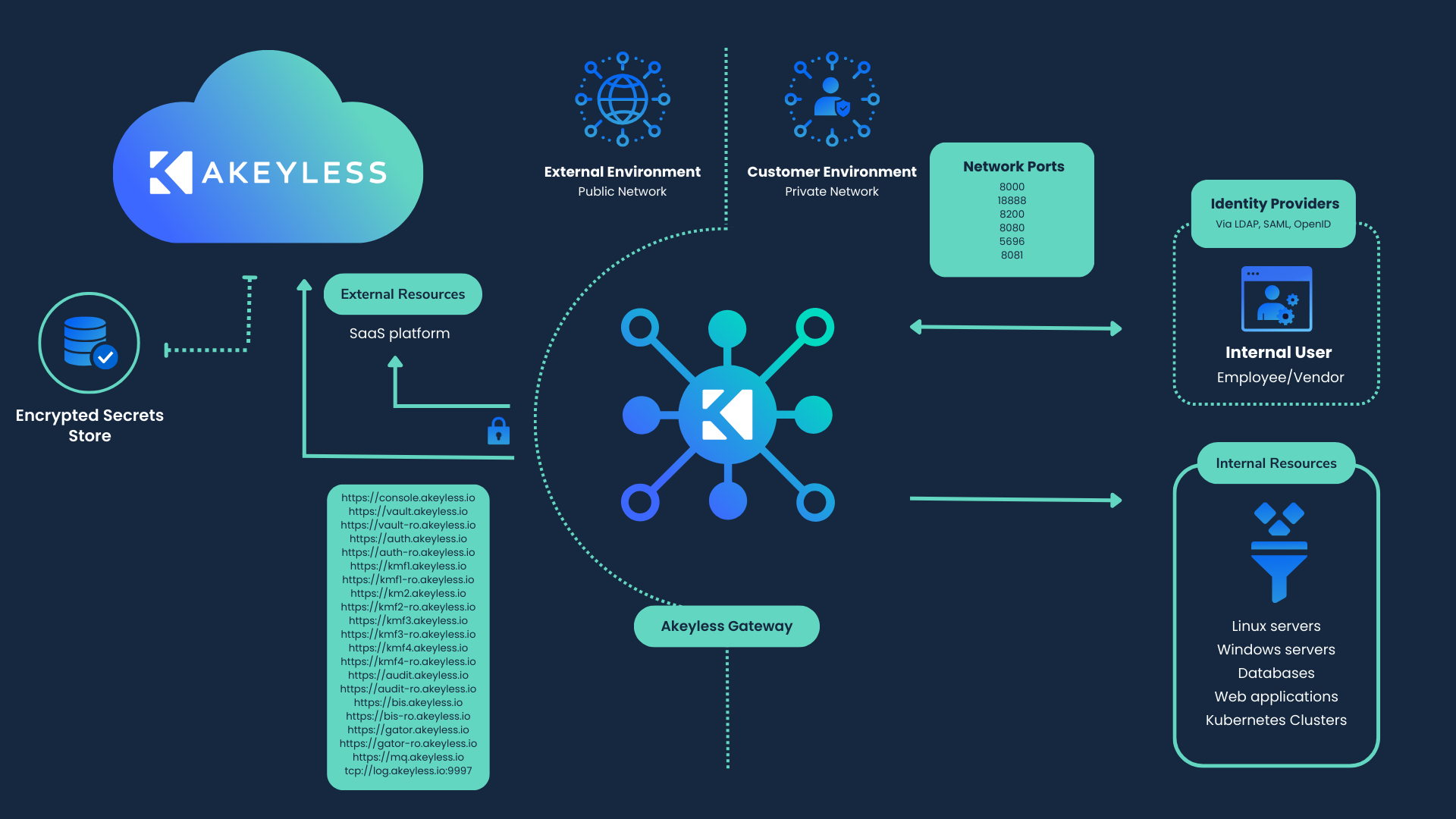
Akeyless Gateway is a customer-hosted runtime component that sits between internal workloads and the Akeyless SaaS.
In practice, the Gateway is a stateless service that receives requests from applications, authenticates and authorizes those requests, brokers access to Akeyless services, and enforces local controls such as TLS settings, caching, and forwarding rules.
This allows internal systems to consume Akeyless capabilities such as Dynamic Secrets, Rotated Secrets, KMIP Server, and Classic Keys without directly exposing internal resources to the public network.
Gateway management access is configured explicitly through the default Gateway identity and allowedAccessPermissions. The primary Gateway identity must have an RBAC Administrative rule scoped to Gateway management with permission scope set to scope or all for Gateway Console (UI) access. CLI and API management can still be allowed when the role grants the required permissions.
To open Gateway management in the UI, use the Akeyless SaaS Console (https://console.akeyless.io) or <gateway-protocol>://<gateway-host>/console, then open the Gateway tab, select the relevant Gateway, and select Manage Gateway.
Users who do not have Gateway-scoped administrative permission (scope or all) cannot see the Gateway in the Gateway list and cannot manage it from the UI.
What the Gateway Does
The Gateway provides a local control plane and data path for secrets and encryption operations.
Key responsibilities include:
- Brokering requests from workloads to Akeyless APIs.
- Enforcing local authentication and access behavior.
- Managing local cache behavior for resilience during SaaS connectivity issues.
- Applying local transport security and certificate trust settings.
- Forwarding logs and telemetry into enterprise observability systems.
How It Fits in Your Architecture
At a high level, workloads call the Gateway, and the Gateway communicates with Akeyless SaaS services over outbound connectivity.
For SaaS service endpoint and connectivity requirements, see Gateway Network Connectivity.
Deployment Models
You can deploy Akeyless Gateway in several operating models, depending on your infrastructure and scaling requirements:
With this Gateway, Akeyless offers:
-
Live fallback for network connectivity issues: Gateway Network Connectivity
-
Service continuity through local in-memory caching and offline access patterns: Gateway Caching
-
Log forwarding to an existing SIEM server: Gateway Log Forwarding
-
Zero-Knowledge encryption support: Gateway Zero Knowledge
Gateway Lifecycle Navigation
- Start deployment planning in Choose a Deployment Model.
- Configure runtime behavior in Configure Gateway.
- Operate and monitor in Operate Gateway.
- Review Gateway Best Practices for security, management, and high availability guidance.
Tutorial
Check out our tutorial video on Installing and Configuring the Gateway.
Updated 6 months ago