
Security Health
A scored view of your personal credentials — how reusable, how fresh, and whether any have
turned up in a public breach.
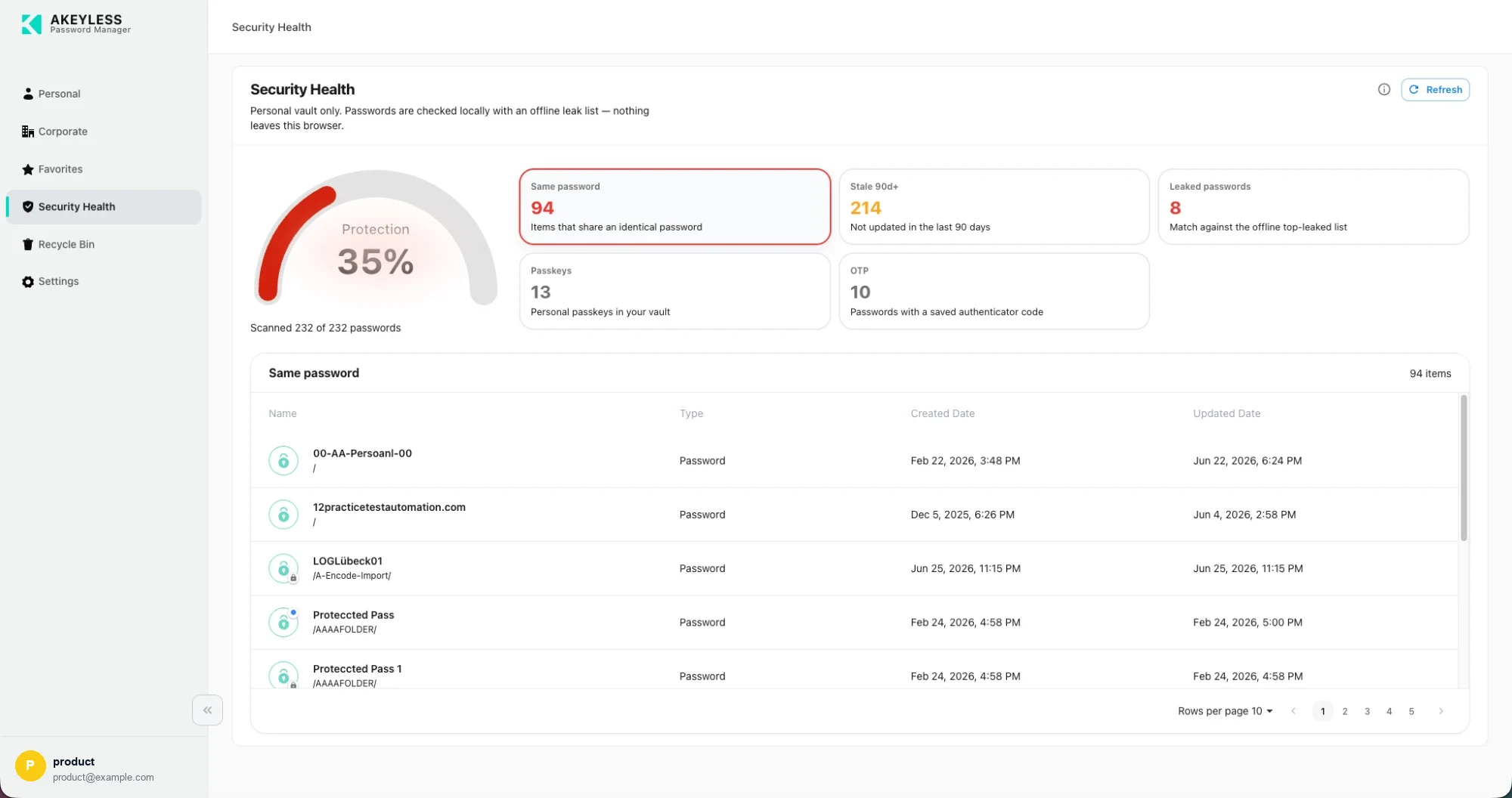
A 35% protection score, with the Same password metric selected and its items listed below
Personal vault only. Passwords are checked locally against an offline leak list —
nothing leaves this browser. Corporate and team items are deliberately out of scope:
your personal security score should not move because a colleague reused a password in a
shared folder.
The scan
Opening Security Health starts a scan. It cannot score what it has not read, so it fetches
each personal item's value.
Progress is shown beneath the gauge — Scanned 232 of 232 passwords — and Refresh in the
top right rescans. The ⓘ icon explains the score in product.
Results are cached for the session.
How the score is calculated
The protection score runs 0–100, from two pillars worth 50 points each.
Uniqueness (50 points)
Reduced by two independent problems, applied together:
| Factor | Effect |
|---|---|
| Reuse | The proportion of password items sharing a password with at least one other |
| Breach | The proportion matching the bundled offline leak list |
Both are ratios of your total password count, so three reused out of five costs far more than
three out of three hundred.
Freshness (50 points)
The proportion of items — passwords and passkeys — updated within the last 90 days. An
item with no recorded date counts as stale.
Worked example
With 10 passwords, 3 reused and 1 breached, and 5 items fresh within 90 days:
| Pillar | Working | Points |
|---|---|---|
| Uniqueness | 50 × (1 − 0.30) × (1 − 0.10) | 31.5 |
| Freshness | 50 × (5 ÷ 10) | 25.0 |
| Total | 57 |
Special cases
| Case | Score |
|---|---|
| Empty vault | 100 |
| Lists not yet loaded | Indeterminate |
The five metrics
| Tile | Counts | Affects score |
|---|---|---|
| Same password | Items that share an identical password | Yes |
| Stale 90d+ | Not updated in the last 90 days | Yes |
| Leaked passwords | Match against the offline top-leaked list | Yes |
| Passkeys | Personal passkeys in your vault | No |
| OTP | Passwords with a saved authenticator code | No |
Passkeys and OTP are reported because they are useful signals, but they do not move the
number — adding a passkey should not compensate for a reused password.
The item table
Select a tile and the table below fills with the items behind it. The selected tile is
outlined.
| Column | Shows |
|---|---|
| Name | Item name with its folder path |
| Type | Password, Passkey, and so on |
| Created Date, Updated Date | Timestamps — the Updated date is what drives the staleness metric |
The table paginates with its own Rows per page control, so a metric with hundreds of items
stays usable.
Acting on the results
| Finding | Do this |
|---|---|
| Leaked | Change it at the source, then update the item — highest priority |
| Same password | Generate a unique one per item |
| Stale 90d+ | Rotate the ones that matter; a dormant account matters less |
| No OTP | Add an authenticator where the site supports it |
Related
Updated 21 days ago