
Accessibility
The extension is built to be usable with a screen reader and without a mouse.
Screen reader support
Live status announcements
Outcomes that would otherwise be visual-only are announced to assistive technology through a
polite live region, meeting WCAG 2.2 success criterion 4.1.3 (Status Messages).
Announced events include copying a value, saving an item, completing a scan, and errors.
Secret values are never announced. Only short outcome phrases such as "Password copied"
are sent to the live region — never the credential itself, which would otherwise be read
aloud or exposed to any assistive technology listening.
Labelled controls
Every icon-only control carries a text label for screen readers: the sidebar tabs, Launch,
View Details, More Options, copy controls, close buttons and the filter funnel.
Decorative icons are hidden from assistive technology so they are not announced as meaningless
graphics.
Semantic roles
| Element | Role |
|---|---|
| Overlays (create, edit, share, delete) | dialog, marked modal so focus is trapped |
| Type and tag filter tabs | tab with selected state announced |
| Access ID history, dropdowns | listbox / option |
| Status and progress text | status with polite live updates |
| Errors | alert |
| Loading lists | Busy state announced while fetching |
Tooltips
Icon-only controls show a tooltip on hover and on keyboard focus, so the left rail is
readable without memorizing the icons.
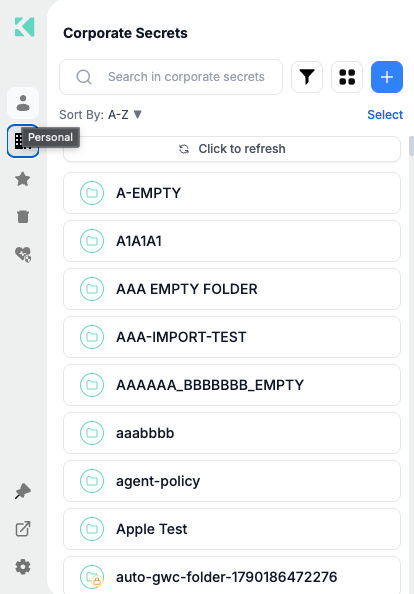
Hovering a sidebar icon names the area it opens
Keyboard
| Key | Does |
|---|---|
| Tab / Shift+Tab | Moves through controls in reading order |
| Enter / Space | Activates the focused control |
| Escape | Closes the open overlay or dropdown |
| Arrow keys | Moves within dropdowns and lists |
Overlays trap focus while open, so Tab cycles within the dialog rather than escaping to the
page behind it, and focus returns to the control that opened it on close.
Visual
| Feature | Detail |
|---|---|
| Dark mode | A full dark theme rather than an inverted filter — see Extension Settings |
| Side panel | Docking gives a resizable, persistent panel rather than a fixed 416px popup — see Side Panel & Sidebar |
| Status color | Never the only signal — the Security Health gauge pairs color with a numeric score, and password strength pairs color with a worded rating |
| Browser zoom | Supported; layouts reflow rather than clipping |
Secure paste and assistive technology
When your account enables secure paste, values are written straight into the target field
rather than passing through the clipboard or being revealed on screen. Screen reader users
still get a confirmation that the fill happened, without the value being read out.
See Copy/Paste & Secure Paste Mode.
Reporting a problem
If something is unreachable by keyboard or unreadable by a screen reader, report it through
Settings → Contact Support with the extension version from the Settings footer.
Related
Updated 21 days ago