
Password Generator & Strength
Available wherever you enter a password — the create and edit overlays, and the suggestion
popup on signup and password-change forms. Select the refresh icon beside the password
field to open it.
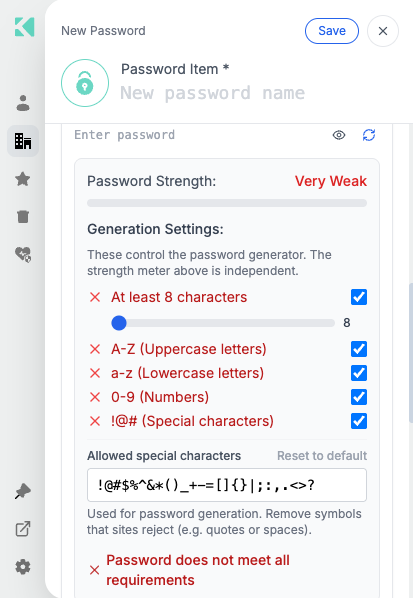
The strength meter, the generation settings, and the requirements checklist
Two independent things
The strength meter and the generation settings are separate.
The Generation Settings control what the generator produces. The Password Strength
meter above them judges whatever is currently in the field, whether you generated it or
typed it. Ticking every box does not make a weak password strong.
Password Strength
Rates the current value from Very Weak to Strong, using an estimate of how much work a
real attacker would need. It accounts for:
| Weakness | Example |
|---|---|
| Dictionary words | correcthorse |
| Keyboard runs | qwerty, 123456 |
| Repetition | aaaa, abcabc |
| Dates and years | 1990, 2026 |
| Common substitutions | p@ssw0rd |
This is why a password that satisfies every checkbox can still read Very Weak — Password1!
has upper, lower, digit, symbol and 10 characters, and is still among the first an attacker
tries.
Generation Settings
| Setting | Controls |
|---|---|
| At least N characters | Minimum length, set with the slider |
| A–Z (Uppercase letters) | Include uppercase |
| a–z (Lowercase letters) | Include lowercase |
| 0–9 (Numbers) | Include digits |
| !@# (Special characters) | Include symbols |
| Allowed special characters | Exactly which symbols may be used |
Allowed special characters
Some sites reject particular symbols — quotes and spaces are the usual culprits. Edit the
field to remove them, and the generator will avoid them.
Reset to default restores the standard set.
The requirements checklist
Each requirement shows a tick or a cross against the current value, and a summary line reads
Password does not meet all requirements until everything passes. The item cannot be saved
while a requirement fails.
Passphrase mode
Instead of a random character string, the generator can produce a memorable passphrase built
from a 100,000-word English dictionary using a cryptographically secure random source.
Passphrases are generated to satisfy your organization's policy directly, rather than
re-rolling until one happens to pass.
Use them where you will have to type the password by hand — a device login, a recovery
account — and random strings where the extension will fill it for you.
Breach check
The value is checked against a list of passwords known from public breaches. A match is
flagged:
Found in common breached password lists
This runs entirely offline. The comparison uses a filter bundled inside the extension.
Your password is never sent anywhere — not to Akeyless, not to any third-party breach
service, not even as a hash.
The check is one-directional: flagged means definitely leaked; unflagged means probably not.
Account password policy
Where your organization sets a policy, it drives the generator defaults and the checklist, and
cannot be relaxed below the organization's minimum. See
Setting Password Policy On Account Level.
Related
Updated 21 days ago